
Where should you place an indoor air-quality monitor?
Choose an air quality monitor height and location for bedrooms, kitchens and offices. Avoid heat, drafts and mist that can distort readings.
Put an air-quality monitor on a sunny windowsill and its temperature may climb. Move it beside an air purifier and the particle reading may look wonderfully clean. Leave it next to your chair and your own breath can push CO₂ higher.
The monitor is doing its job in each location. It is measuring the air that reaches its sensors. Good placement makes that small sample useful for the question you want to answer.
Use the occupied breathing zone, then avoid strong local influences.
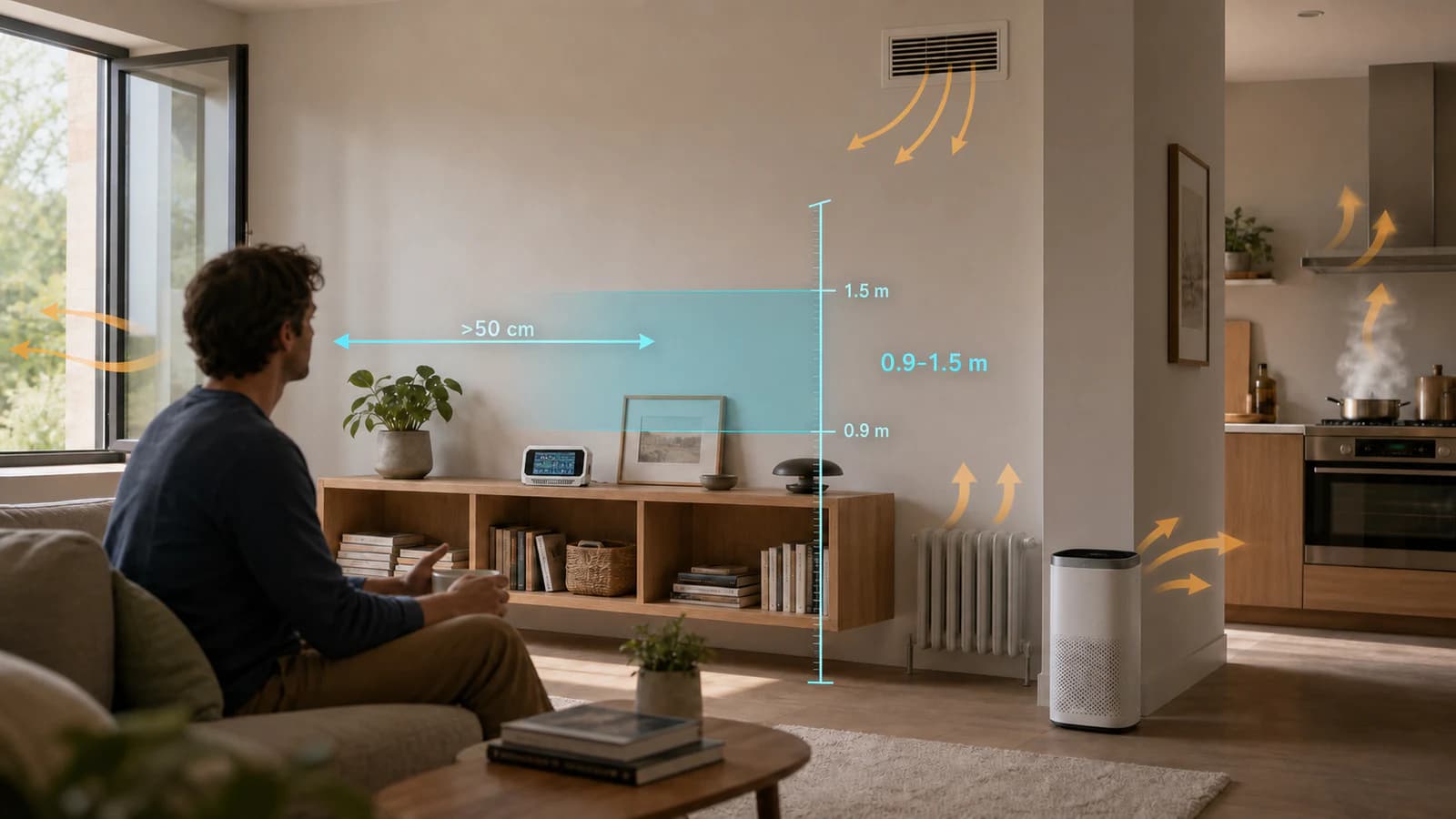
For normal room monitoring, place the device in the occupied part of the room at approximately breathing height, with open airflow around it. In many homes, 0.9 to 1.5 metres above the floor is a useful starting range. Adjust the height for the people and activity in that room.
Keep a CO₂-capable monitor more than 50 cm from anyone's face. Keep it out of direct airflow from windows, doors, supply vents, fans and air-cleaner outlets. Avoid direct sunlight, radiators, cooking plumes, steam, humidifier mist and enclosed shelves. Do not block its air inlets or outlets.
That height range is practical guidance, not a universal mounting law. The US EPA recommends the typical breathing zone of 3 to 6 ft, while the UK Health and Safety Executive recommends head height. A bedroom, classroom and standing workshop do not share one perfect height.
Start with the air you want to understand
There are two useful ways to place a monitor.
Representative room monitoring
This is the everyday position. You want the reading to follow the air people normally breathe in the room. Place the monitor away from one strong local source or clean-air outlet, then leave it in the same position while you compare days, activities and ventilation choices.
This position can answer questions such as:
- Does CO₂ build up overnight in the bedroom?
- How far do cooking particles spread into the living area?
- Does opening a window clear the room or bring outdoor pollution inside?
- How long does the room take to recover after cleaning or workshop work?
Source investigation
Sometimes the local plume is exactly what you want to measure. You might move a monitor closer to a cooker hood, printer enclosure, closed window or air-cleaner outlet to see how that specific area behaves.
Treat the result as a source test. A monitor beside a frying pan describes the cooking plume. It does not describe the average air at the sofa across the room.
Keep temporary tests sensible. Do not spray cleaners into the monitor, place it in steam, or expose it to grease and heavy dust. Concentrated material can contaminate the sensor openings and make later readings less reliable.
A practical placement checklist
| Check | A useful everyday position | What to avoid |
|---|---|---|
| Height | Near the breathing height for the room's normal activity | Floor level, near the ceiling, or one fixed height for every room |
| People | More than 50 cm from a person's face for CO₂ | A desk position directly in the exhaled-air path |
| Airflow | Open air around the enclosure and sensor openings | Corners, closed cabinets, deep shelves and blocked vents |
| Windows and HVAC | Outside the direct stream from windows, doors and supply openings | A windowsill, fan outlet or ventilation jet for general room monitoring |
| Pollution sources | Far enough away that one local plume does not dominate | Direct cooking smoke, sprays, steam, candles and workshop exhaust |
| Clean-air sources | In the mixed room air | Directly beside a purifier outlet or filtered supply |
| Heat and light | Shaded and away from strong heat sources | Direct sunlight, radiators and hot electronics |
| Time | Fixed through normal occupied periods | Moving it repeatedly, then comparing readings as if location did not change |
The distances depend on the room and airflow. A visible draft, warm plume or obvious smell reaching the device matters more than a universal number copied from a different building.
Where to place a monitor in each room
Bedroom
Use a stable bedside table, open shelf or chest of drawers near the sleeping breathing zone. Keep the monitor more than 50 cm from the sleeper's face, and do not put it directly beside an open window, radiator or humidifier.
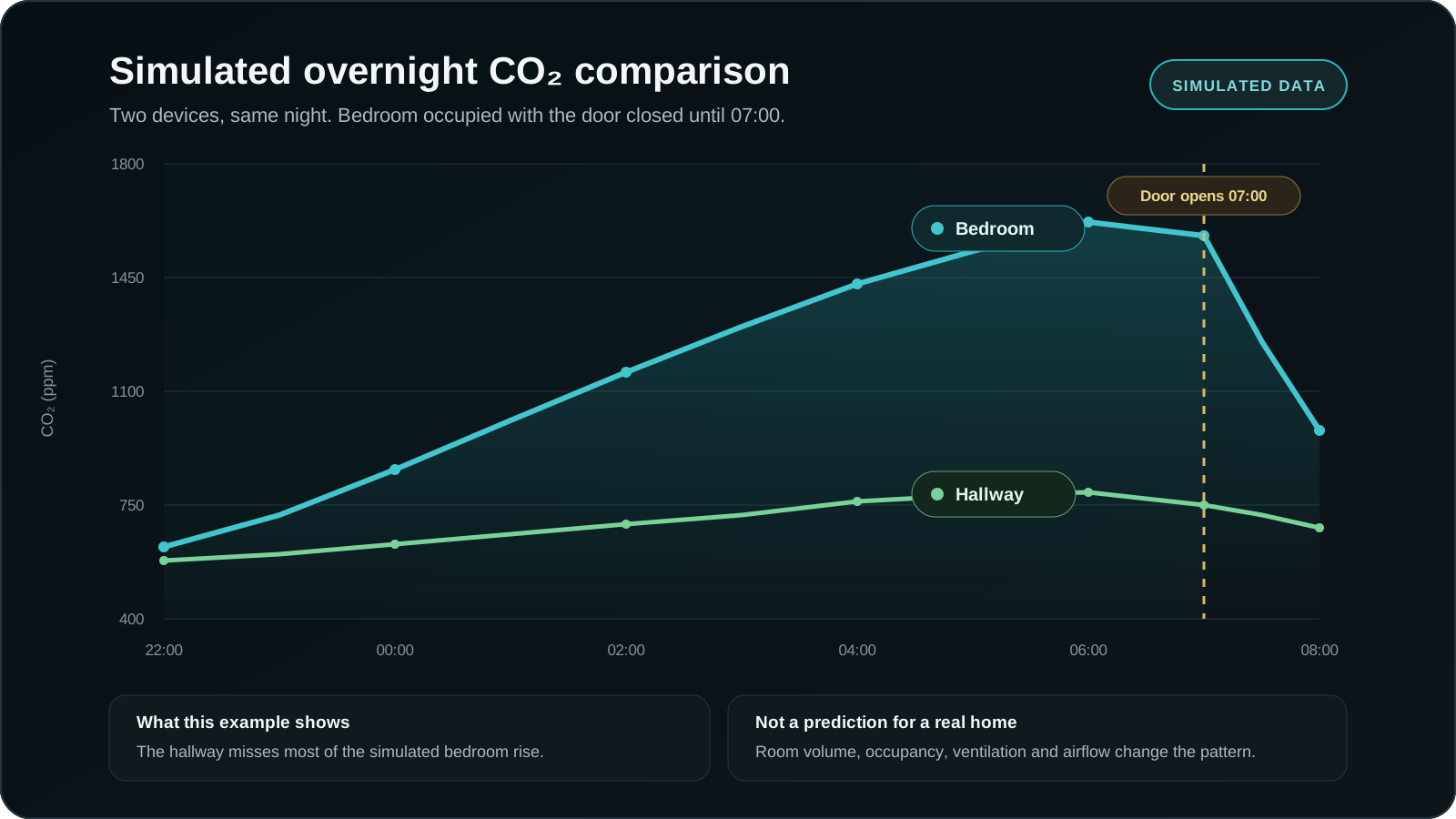
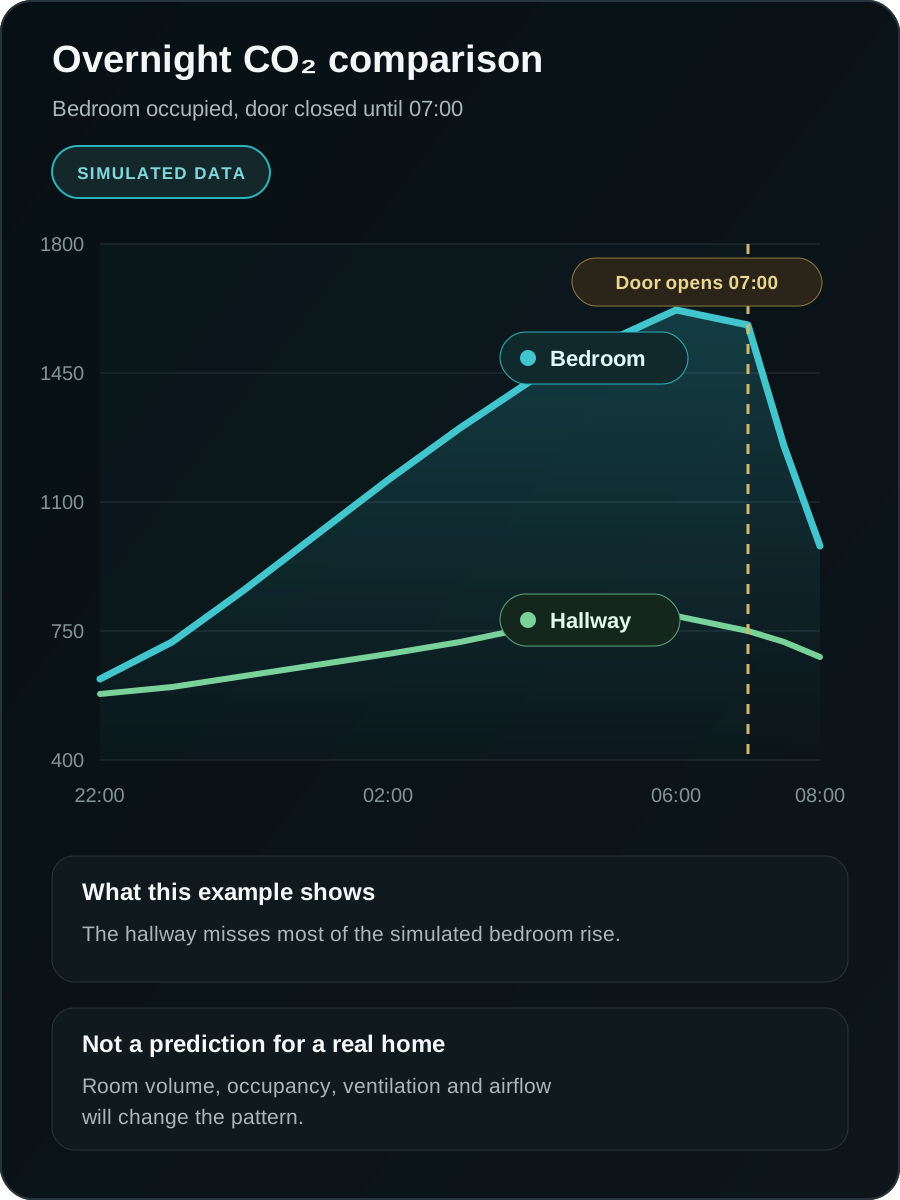
To understand overnight CO₂, keep the monitor inside the bedroom while the door is in its usual position. A hallway monitor may not show the same build-up behind a closed bedroom door. The indoor CO₂ guide explains how occupancy and ventilation shape the trend.
Living room
An open shelf or side table near the main seating area usually works well. Keep it away from a fireplace, candle, television exhaust, sunny window and purifier outlet.
In an open-plan room, decide whether you care most about the seating area or the kitchen boundary. A position beside the hob may overstate cooking exposure at the sofa. A position beside the sofa may miss the intensity of the source itself.
Home office
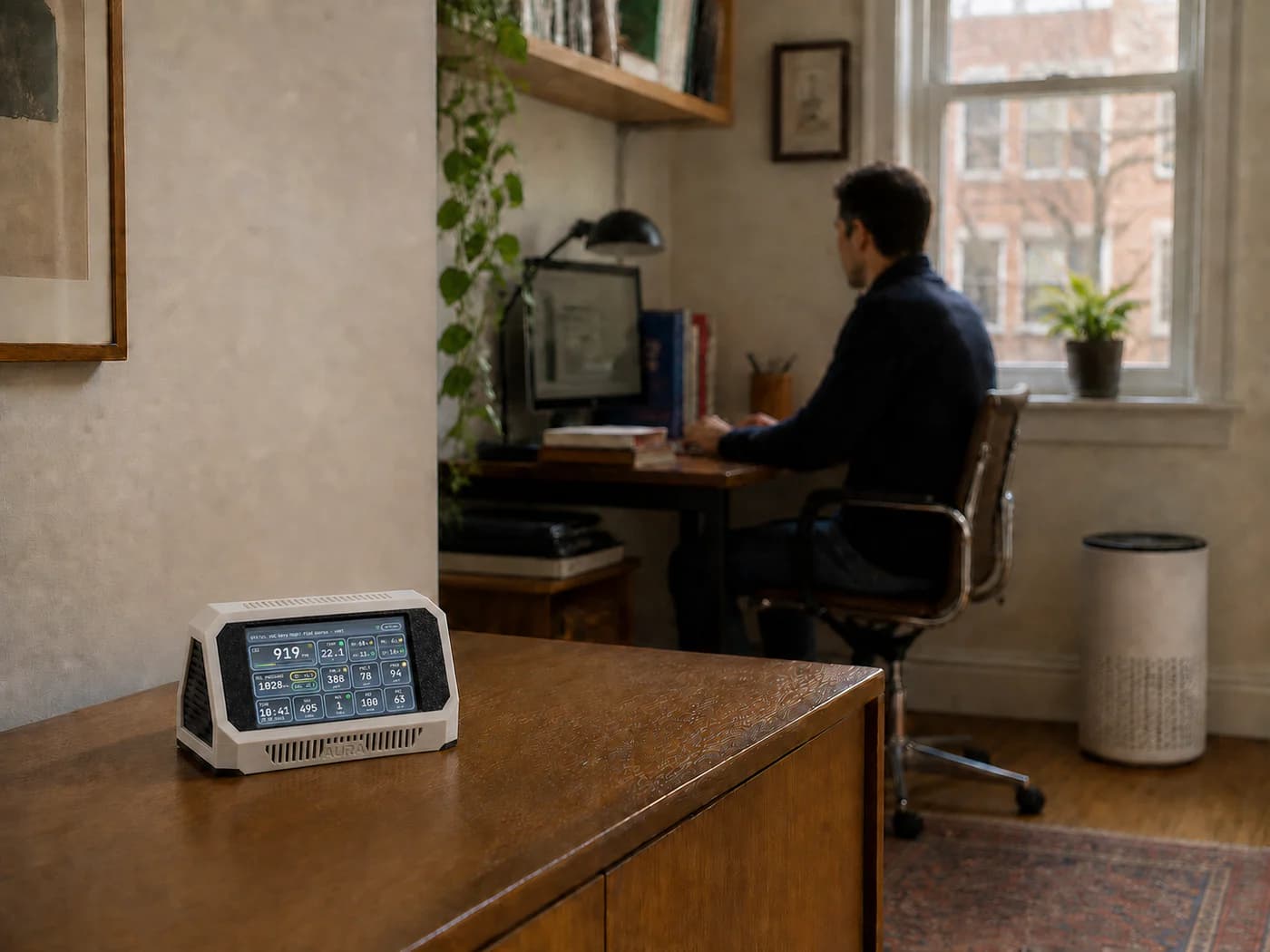
Place the monitor around seated head height on the open edge of a shelf or desk. Give it space from your face and from the hot exhaust of a computer, monitor, dock or printer.
A monitor directly between you and the screen can respond as you lean forward and speak. Moving it to the side often gives a better picture of the room while keeping it close to the occupied zone.
Kitchen
For general exposure, use an open shelf, sideboard or dining area outside the direct cooking, steam and grease plume. The aim is to measure what spreads into the occupied room after the emissions have mixed with the air.
Move the device closer only for a short cooker-hood or source test. Keep it out of splashes and never place it directly above a hob or kettle.
Nursery or child's room
Choose a secure location that reflects the child's occupied height while remaining out of reach. Secure the monitor and power cable so neither can be pulled down.
Keep it away from the cot or bed, direct humidifier mist, a radiator and the opening path of a window. Physical safety comes before the theoretically perfect sampling point.
Classroom or meeting room
Place the monitor near seated head height, more than 50 cm from the nearest person, and away from doors, windows and supply openings. The HSE notes that larger spaces often need more than one sampling location because CO₂ can vary across the room.
A position at the teacher's desk may be convenient, but it is useful only when the desk is not beside a door, open window or ventilation grille.
Workshop or maker space
For everyday monitoring, use an open shelf near the working breathing zone but away from the direct exhaust of a soldering station, printer enclosure, laser cutter or dust collector.
For a containment test, move the monitor towards the boundary of the enclosure or extraction area. Mark that period as a source test and return the device to its normal location afterwards.
Bathroom
Check the monitor manufacturer's environmental limits before leaving it in a bathroom. Keep any non-waterproof device away from splash, condensation and shower steam. A temporary position outside the wet zone can help you observe humidity clearance, but a bathroom is a harsh place for exposed electronics and optical sensors.
Why certain locations change the readings
Your breath creates a local CO₂ plume
Exhaled breath contains much more CO₂ than room air. A monitor near your face can record that concentrated plume before it mixes with the room. The HSE therefore recommends keeping CO₂ monitors more than 50 cm from people.
The sensor is reporting a highly local sample rather than the wider room.
Windows, doors and vents create fast-changing air
An open window can send outdoor air straight across the sensor. A supply vent can create a pocket that is cleaner, cooler or drier than the occupied room. A doorway can mix air from another zone each time someone walks through it.
These locations are useful when you want to test infiltration or ventilation. They make weak everyday positions when you want a stable room picture.
An air purifier creates a clean-air pocket
An effective particle filter lowers PM in its outlet air. A monitor beside the outlet may show how the filter performs at that point, while people across the room still breathe a different mixture.
Place the monitor in the occupied, mixed air when you want to judge room clearance. Watch how quickly the reading falls after the purifier starts rather than measuring only the outlet.
Sunlight and heat affect more than temperature
Direct sun warms the enclosure and can distort temperature and relative humidity. Radiators and electronics create smaller warm plumes. Sensirion's SEN6x mechanical guidance also warns that direct light entering the sensor openings can affect particle measurements.
A shaded location away from heat sources gives the temperature and humidity channels a fairer chance.
For moisture and condensation, the relative humidity and dew-point guide explains why a reading in the middle of the room does not describe conditions at a cold window or wall.
Ultrasonic humidifiers can produce real particles
A PM spike beside an ultrasonic humidifier is often dismissed as the optical sensor being confused by water. Ultrasonic humidifiers can disperse minerals from their fill water into the air. The US EPA recommends distilled water when users want to reduce mineral dispersal. A peer-reviewed 2020 study found that mineral content changed the number, size and mass of emitted particles.
High humidity and droplets can still affect an optical measurement. The humidifier may emit real aerosol while the measurement conditions also become harder for the sensor. Keep the monitor out of direct mist and note the humidifier type, water and timing when interpreting the graph. The particle guide covers the wider limits of optical PM readings.
Can one monitor cover the whole home?
A monitor reports its local air. Walls, closed doors and separate ventilation paths divide a home into different air volumes.
If the main question is overnight bedroom ventilation, monitor the bedroom. If the question is cooking pollution reaching the living space, monitor the living side of that boundary. A device in the hallway may miss both events.
There is no honest square-metre coverage number for a divided home. One monitor can still teach you a lot if you rotate it with a plan:
- Choose the rooms where people spend the most time.
- Leave the monitor through the normal activity you want to understand, including sleep where relevant.
- Record occupancy, doors, windows, cooking, cleaning and filtration.
- Compare repeated patterns rather than one peak.
- Remember that adaptive VOC and NOx indices respond to their recent environment, so moving rooms changes their context.
Use multiple monitors when you need simultaneous room comparisons, closed-door bedroom data, or evidence of how an event moves through the home.
A simple way to test a placement
Two sensible candidates and good notes are enough to test a position at home.
- Choose the question. For example: What is the bedroom air like while we sleep?
- Choose two plausible locations. Avoid using one obviously poor position only to make the other look better.
- Keep the normal routine. Note occupancy, door and window state, heating, humidifier use and filtration.
- Observe a full relevant activity. For a bedroom, include the occupied night and morning ventilation. For a kitchen, include cooking and the clearance period.
- Look for repeated timing. A useful position follows the event without being dominated by every breath, draft or appliance outlet.
- Keep the chosen position fixed. Consistency makes trends across days and seasons easier to interpret.
Two monitors can compare locations at the same time. One monitor can compare them on similar days, but weather and activity will add uncertainty. Write that uncertainty down rather than pretending the two days were identical.
A note about Aura AQ and the SEN66
Aura AQ uses the Sensirion SEN66 for its standard PM, CO₂, VOC Index, NOx Index, temperature and humidity measurements. One position therefore has to serve several sensors with different sensitivities.
Use Aura AQ in the orientation intended by its enclosure, keep the openings clear, and avoid directing strong airflow into them. The same placement principles help other multi-sensor monitors, but their manuals and environmental limits still apply.
Adaptive gas indices need extra context after a move. Sensirion maps the VOC Index against the previous 24-hour gas background. A different room changes that background. CO₂ and PM can show an event quickly, while VOC and NOx trends deserve a longer view. The VOC and NOx Index guide explains how those learned references behave.
Frequently asked questions
Can I put an air-quality monitor on a shelf?
Yes. Use an open shelf with free air around the device, preferably near the front rather than deep inside a bookcase. Keep the sensor openings clear and avoid shelves heated by electronics, radiators or direct sunlight.
Should an air-quality monitor be near a window?
Not for a representative room reading if the window creates a direct draft. A window-adjacent position can be useful for a temporary infiltration or ventilation test, but label it as that test and return the monitor to its normal room position afterwards.
Can I place it beside an air purifier?
The purifier outlet creates a local clean-air pocket, so that position can make the wider room look cleaner than it is. Place the monitor in occupied mixed air when you want to judge whole-room clearance.
Where should it go in a bedroom?
Use a stable nightstand, open shelf or chest of drawers near the sleeping breathing zone. Keep it more than 50 cm from the sleeper's face and away from the window, radiator and humidifier mist.
How far should it be from my face?
The UK HSE recommends more than 50 cm for CO2 monitors because exhaled breath can cause misleadingly high local readings. More separation may help at a desk if speaking or movement repeatedly sends breath towards the device.
How many air-quality monitors do I need?
Start with the room linked to your main question. Add monitors for other important closed rooms or distinct zones when you need simultaneous data. Floor area alone cannot tell you how many devices a divided home needs.
Can I move one monitor between rooms?
Yes, if you document each location and allow enough time to observe normal activity there. Avoid comparing immediate readings as though nothing changed. Adaptive gas indices also carry recent environmental history.
Does an indoor air-quality monitor replace a carbon monoxide alarm?
No. Use a certified carbon monoxide alarm installed according to its instructions and local rules. Aura AQ is an environmental monitor, not a certified life-safety alarm.
Sources and further reading
This guide prioritises primary and authoritative sources. Accessed 14 August 2026.
- US EPA: A Guide to Siting and Installing Air Sensors
- UK HSE: Using CO₂ monitors
- Sensirion: SEN6x Mechanical Design and Assembly Guidelines
- Sensirion: SEN66 product information
- Sensirion: SGP41 datasheet and Gas Index explanation
- US EPA: Use and Care of Home Humidifiers
- Yao et al.: Human exposure to particles at the air-water interface
- GOV.UK: Approved Document J
- GOV.UK: Smoke and Carbon Monoxide Alarm Regulations guidance
Aura AQ is an environmental monitor, not a medical device or certified life-safety alarm. Use local building, workplace and public-health requirements where they apply.