An existing part of Link, available in private alpha.
Private alphaAura AQ Link · Online service
Your home. Within reach.
Your Aura readings, Hub locations, history and alerts, together on your phone. Check home from work. Keep an eye on the workshop. See what changed while you were away.
Try the read-only demo now. Personal accounts remain in private alpha. Link’s Home Assistant connector and device control are planned.
Already use Home Assistant? See what Link adds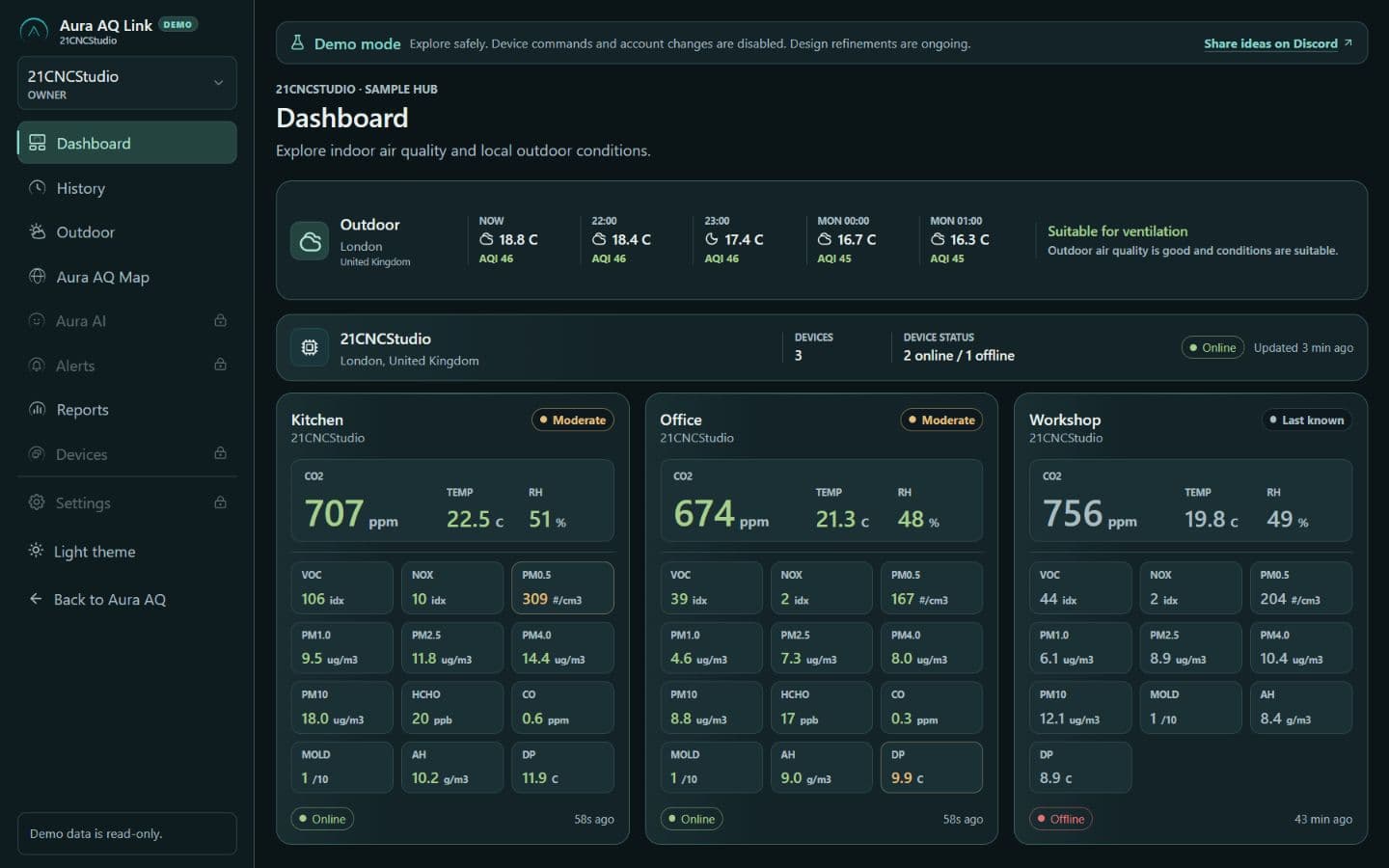
A web console with browser push in private alpha.
Aura and Hub keep their local monitoring without a subscription.
The Aura setup we recommend
Aura measures. Hub connects.
Link brings it with you.
Start with Aura AQ devices and a Hub at the place you care about. Add Link when you want to see it from anywhere.
Aura AQ
Measures the air where you live and work, with readings on the device.
Meet Aura AQAura AQ Hub
Brings rooms onto a local screen and publishes their data to HA over MQTT. Pair with Link for online services.
Explore the HubAura AQ Link
Connects your locations with remote monitoring, hosted history, alerts and outdoor context.
Private alphaRoom to grow. Future Aura Satellites will extend the system. Selected Zigbee devices are the first planned step for Hub control; compatible models still need testing.
Already use Home Assistant?
What Link adds to
your Home Assistant.
Your automations and history stay in HA. We are building Link around the jobs that need extra setup: reaching another property, sharing a few controls, and checking what happened while you were away.
Start with Hub at home.
Local MQTT · In firmwareAura AQ devicesYour room measurements
Aura AQ HubOne local MQTT connection
Home AssistantYour dashboards and rules
Hub’s firmware publishes each connected Aura device’s readings, availability and discovery to your local HA setup. Use them in your own dashboards and automations without a Link subscription. Broker setup is currently manual; the guided connection flow and support for future Satellites are planned.
What Link will add.
Keep that local foundation. The remote locations, guest controls and HA alerts below are planned additions through Link.
A second place. One HA server.
Your workshop or holiday home is on another network. Put a Hub there and use Link to bring selected readings and supported controls into the HA you already run at home.
One main HA setup, with a Hub looking after the remote location.
A guest link for the weekend.
Let a visitor control the bedroom lights for the weekend. Share a Link page or QR with only the HA actions you allow, an expiry time and access you can revoke.
The guest uses a browser. Your HA settings stay private. A Hub beside HA is optional.
A heads-up when HA goes quiet.
Get an alert when Link loses contact with HA. A powered, online Hub could keep sending its own Aura readings, so you still have a view of those rooms while HA is unavailable.
See the last contact and known readings. The cause of a lost connection may be unknown.
Know whether that scene finished.
You tap your chosen Leaving scene. Did the workshop plug report off? Link should show each supported device’s result and flag anything unconfirmed, with only your permitted follow-up actions.
Confirmation needs fresh device feedback. Stale or missing states stay visibly unconfirmed.
Less to set up.
Less to maintain yourself.
The goal is one supported setup: pair the Aura extension in HA with your Link account, choose your locations and allowed actions, then manage guest access and alerts together. A subscription would keep that remote service running and maintained.
HA at home. A Hub in the workshop.
Planned connectionHome AssistantYour main home
Aura AQ LinkSelected data and actions
Aura AQ HubYour remote location
No second HA server at the workshop, and no Hub required beside HA at home. The connector, guest permissions and remote commands still need development. Remote actions require internet and the relevant Hub or HA system online.
Alerts and history
Get the alert.
See what happened.
Browser push · Private alphaA device has stopped reporting. A room needs a closer look. Get an alert, then open Link for the readings and history behind it.
Charts, incident history and weekly or monthly reports help you see when a change started and whether it keeps happening.
Push needs a supported browser, permission and internet. Alerts for future Hub and HA features are still in development.
Aura AQ Linknow
Workshop device is not reportingCheck the last reading and connection status in Link.
Know that contact was lost. Check what happened before it.
A better-informed next step
The room needs air.
What is outside?
Opening a window can improve indoor CO₂ while bringing in smoke, pollen or heat. Link puts Aura readings alongside available outdoor air quality, weather and ventilation guidance.
See the reasons, sources and timestamps behind the guidance. Use the map to explore wider environmental conditions, including regional hazard and weather-warning coverage where available.
Explore in the demo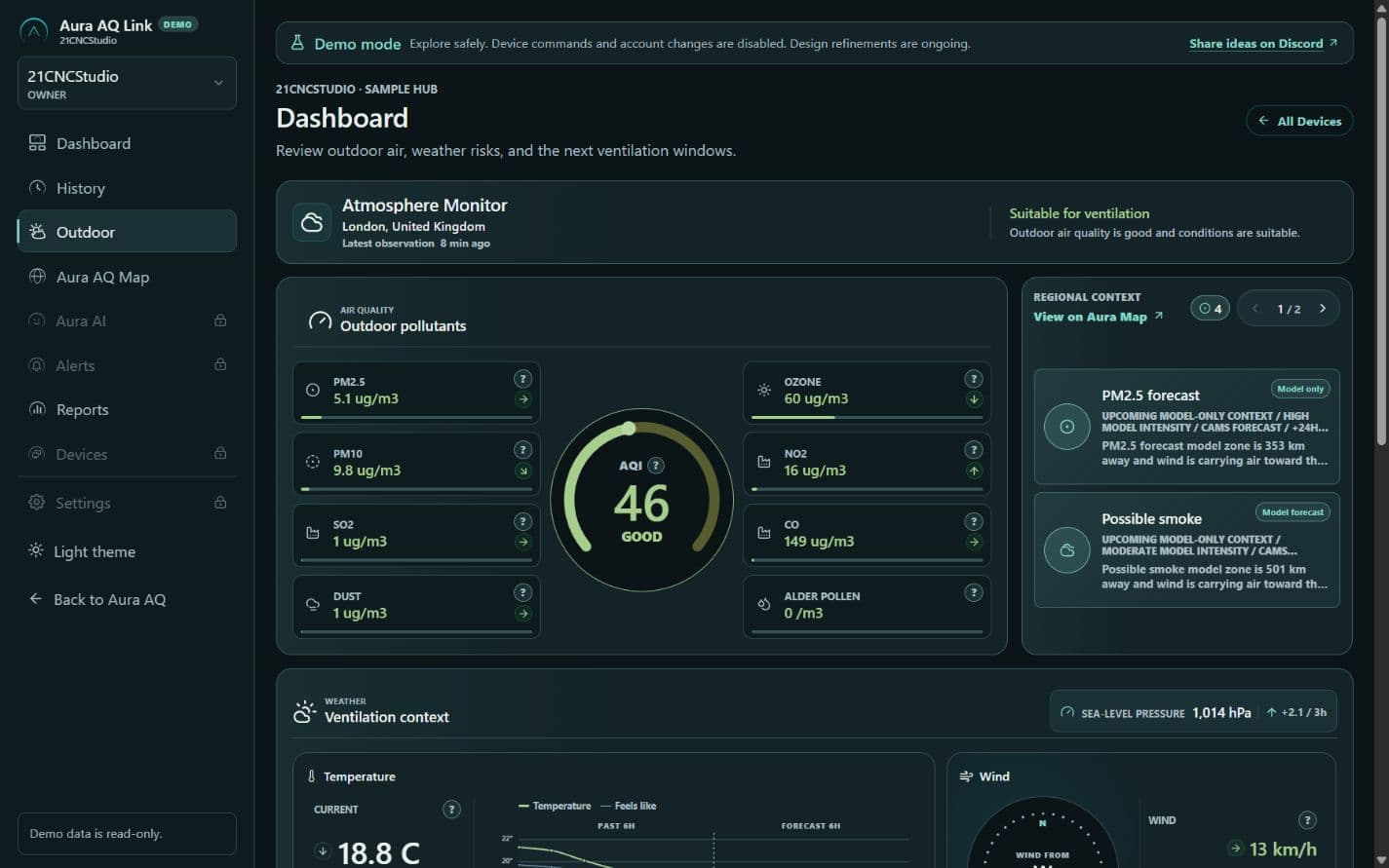
Indoor measurements and outdoor context, with reasons for the recommendation.
Planned: put this context
to work in HA.
Bring selected weather, outdoor air quality, environmental warnings and supported home events into your HA rules. For example, consider outdoor air and temperature before a high CO₂ reading triggers ventilation. This broader HA export is planned; online feeds need internet, with sources and timestamps kept visible.
Captured from the public demo on September 27, 2026. The alpha continues to evolve; provider coverage varies by region.
Data sources and coverage
indoor device readings
local weather and outdoor air
regional atmospheric models
natural-hazard events
official US warnings
official regional warnings
aurora and space-weather context
specialized Open-Meteo forecast layers
Open-Meteo air-quality forecasts incorporate CAMS data. The separate CAMS layer is still being integrated. Regional models and hazard signals describe wider conditions; they are not measurements at your home.
Project status · Updated September 27, 2026
Try what works.
See what comes next.
Explore today
- A real, read-only interface
Dashboard, Outdoor view and environmental map, with sample indoor data.
- Outdoor context and guidance
Available air-quality and weather feeds, ventilation guidance, sources and freshness.
- Privacy-rounded map
Wider environmental conditions without exact Aura device addresses.
With paired devices
- Your Hubs and locations
Paired devices, remote readings and connection status in one account.
- History and reports
Charts, export, and weekly or monthly summaries based on recorded measurements.
- Alerts and device health
Browser push, missing-data incidents and firmware update checks.
Where we are heading
- HA, guest access and control
A remote HA connector, scoped guest actions and selected device control. Hub’s separate local MQTT publishing is already implemented in firmware.
- Alerts that fit your life
More delivery channels are in development. Personalised environmental alerts and Hub/HA event alerts are still being developed or planned.
- More context and clarity
Selected weather, outdoor-air, warning and home-event exports to HA are planned. Regional coverage is expanding; AI-assisted reports and self-service history deletion are also planned.
Optional by design
Your home keeps its independence.
Aura monitoring and Hub’s local MQTT connection to HA work independently of Link. Your local HA history and automations stay yours. Add Link for online services.
A subscription for the service around your home.
Remote access to your readings, hosted history, notifications and reports give Link an ongoing job. A paid subscription is planned; pricing and limits will be published before subscriptions open.
You choose what to pair and can disconnect or export your data. Link needs internet for remote updates and delivery. If contact is lost, the last known reading must not be mistaken for a fresh one.
A few practical questions
Before you connect.
Can I use Link today?
Anyone can explore the read-only demo. Full Link access is limited to approved private-alpha accounts. Demo indoor readings are sample data; outdoor feeds are live where labelled. The interface and feature set can still change.
Do I need a Hub or Home Assistant?
We recommend Aura AQ devices, a Hub and Link as one setup. Home Assistant is optional. The planned HA connector should also connect an existing HA installation to Link without a Hub beside that server, including selected guest actions. That connector is not released yet.
Do I need Link for Hub to work with Home Assistant?
No. Hub firmware already publishes connected Aura readings, availability and MQTT discovery to a local broker without Link. Each connected device keeps its own identity and sensors. Setup is currently manual. Guided local setup, future Satellites and the wider weather/event export are separate development work; the remote Link connector is planned.
Why add Link to a Home Assistant setup?
Start with Hub’s local data bridge if you want Aura readings in HA. Link’s planned additions are remote locations, temporary guest controls, loss-of-contact alerts and selected outdoor data for your HA rules. Keep your HA history and automations, including your existing Zigbee setup. These Link-to-HA capabilities are planned, not available in the current demo.
Will this replace my Home Assistant history or remote access?
HA keeps its local history and automations. The planned connector focuses on selected data, remote Hub locations and permitted actions. Link is not a full HA interface, a tunnel to everything on your network or an unlimited hosted copy of every HA entity.
Will alerts arrive on my phone?
Browser push is in private-alpha testing and requires a supported browser, notification permission and an internet connection. Setup depends on the phone and browser. Email, Discord, Telegram, Teams and webhooks are being developed and validated separately. Events from future Hub controls and the HA connector are not available yet.
Can Link turn off a light or control a plug?
That is planned. The first direct Hub-control direction is selected Zigbee devices, with future Aura Satellites extending the system. An HA connector would expose separately permitted HA actions. Supported models still need qualification. Remote actions require internet and the relevant Hub or HA executor online; sending a command alone does not prove the device changed state.
What will the subscription include?
Link is planned as a paid service for remote monitoring, hosted history, notifications and reports, with new capabilities added as they become ready. Prices, retention, device and location limits will be announced before subscriptions open. Local Aura monitoring and Hub’s local MQTT connection to HA remain independent of Link. Disconnect and export are available in alpha; self-service deletion of hosted history is planned.
Start with a look around
See your next setup taking shape.
Explore the read-only demo, meet Hub, and help shape what Link should do for your home.