Working prototypeActive development

Aura AQ Hub

One screen for your home.

Bring your Aura rooms onto one screen, with a local data bridge to Home Assistant if you use it. Family controls, remote locations and useful phone alerts are the next steps.

Zigbee control and the remote Home Assistant connection are planned. Hardware, compatibility and release details may change.

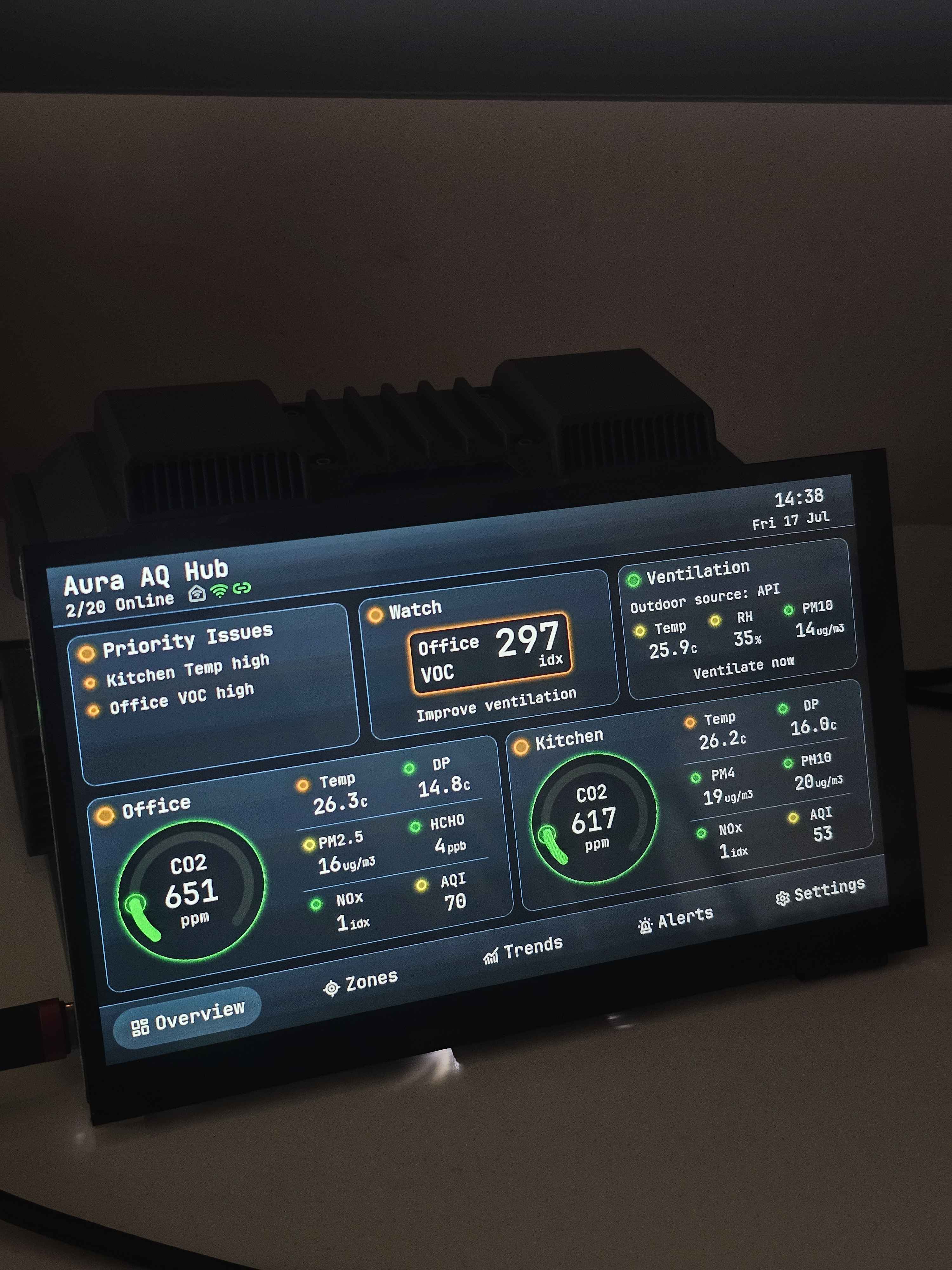
Early prototype · No final enclosureEarly 7-inch Aura AQ Hub prototype showing real Office and Kitchen readings
From the workbenchAn earlier 7-inch prototype connected to real Aura devices. The case behind the display is a bench support. Final hardware and enclosure are still in development.
8real Aura devices

running stably with the current Hub prototype

1screen for all your rooms

see readings from all connected Aura devices at a glance

Linkconnected prototype

current Aura readings sent from the Hub to Link

Eight Aura devices are running stably in the current setup. This is not a published capacity limit or a Zigbee test result.

The everyday problems behind our plans

Make your home easier to live with.

Family controls, a view of your workshop and alerts that reach you. These are the next steps for Hub and Link.

Planned

Controls everyone can use.

Give family and guests the room controls they need, with temporary access you can revoke.

Example of the planned experience

Guest access · Bedroom · Until Sunday

Selected Hub or HA controls. Connecting HA to Link will not need a Hub beside its server.
Planned

Your workshop, closer to home.

Put Hub in a workshop or second home and reach it through Link. Connect that location to your existing HA without setting up another HA server.

  1. Hub at the other location
  2. Aura AQ Link
  3. Your phone or Home Assistant
Remote control is planned and needs internet at both locations.
In development

A useful alert, on your phone.

Get a warning when a room needs attention or a sensor stops reporting. Choose which events matter and limit repeat alerts.

Illustrative notifications
  • Bedroom air needs attention
  • Workshop sensor has stopped reporting
Remote alerts need internet and notification permission.

The small things that make a home easier to use.

Planned

You turn the light off. It stays off.

Pause supported lighting rules for an hour or until morning. See when automation will resume.

Manual mode until 22:30

HA rules must be set up to respect the pause.
Planned

Guests can use the room, too.

Share selected room controls on Hub or through a QR link. Set an expiry and revoke access when the visit ends.

Guest access · Bedroom · Until Sunday

Guests get the controls you choose, with separate permissions.
Planned

Notice a problem before a routine stops working.

See which sensor stopped reporting and when it was last heard from.

Bathroom sensor unavailable · Check power

Availability checks depend on the device; a lost connection does not tell us the cause.
Planned

Know why something happened. Or didn’t.

See why a supported rule paused, and preview a rule before it runs.

Fan paused · Quiet mode for 12 more minutes

Hub will show when a device has not confirmed an action. Explanations depend on the information available.
Planned

Set up presence where you actually sit.

Check an empty room, your usual seat and the light level with guided setup.

Setup check · Is your seat detected?

Presence and light sensors are planned; adjustments depend on the final hardware.
Planned

Leave with a clear picture.

Run a leaving or bedtime routine and see what responded.

Desk lamp off · One plug not confirmed

Supported devices only. Unknown states stay visible; window checks need contact sensors.
Real questions from the smart-home community

These discussions informed the scenarios above. They are not reviews of Aura. Solutions already exist; our aim is to bring a useful set together in Hub and Link.

At home and further away

Your first smart home. Or part of the one you’ve built.

Without Home Assistant

A home everyone can understand.

Start with Aura devices and a shared Hub screen. Selected Zigbee plugs, lights and room routines are planned next.

Monitoring in prototype · Device control planned

With Home Assistant

Your Aura rooms. In your Home Assistant.

Hub publishes readings from connected Aura devices through one local MQTT connection. Each device keeps its own sensors and availability for your HA dashboards and automations. No Link subscription is needed.

MQTT publishing implemented · Guided setup planned

The recommended Aura setup

Measure with Aura. Bring it together with Hub. Stay connected with Link.

Aura AQ measures your rooms. Hub brings them onto a shared screen and into HA over local MQTT. Add Link for online services and outdoor context. Future Satellites will extend sensing and control.

01 · Measure and control

Your devices

  • Aura AQAvailable today
  • Selected Zigbee devicesPlanned
  • Aura SatellitesPlanned
02 · Use locally

Aura AQ Hub

A shared room screen, ventilation guidance and a local MQTT data bridge. Selected device controls and local rules are planned.

Working prototype · Control planned
03 · Reach your locations

Aura AQ Link

Multiple locations in one account. Remote device control and the Link-to-HA connector are planned additions.

Optional service · Active development
Working in prototype

From readings to a useful decision

Know when to open the windows.

The prototype compares your indoor readings with outdoor conditions from Link and gives a ventilation recommendation. You can check the room and the conditions outside in one place.

InsideAura readings
OutsideLink context
On your HubVentilation guidance

A future outdoor Aura Satellite is planned to supply local outdoor measurements, giving this feature a path without Link.

Development status · Reviewed 27 September 2026

A working foundation. A clear next step.

Real Aura devices are monitored in the prototype. Local MQTT publishing is implemented in firmware; guided HA setup, broader data exports and device control still need development and testing.

WorkingIn developmentPlanned
Physical prototype

Working now

Working in prototype

Multi-room readings

The touchscreen receives current readings from real Aura AQ devices on the local network.

Working in prototype

Priority issues

See which rooms and measurements need attention first.

Working in prototype

Ventilation guidance

Indoor readings and outdoor context from Link help you decide whether to ventilate.

Working in prototype

Local Wi-Fi monitoring

Core room monitoring works on the local network without internet or a Link subscription.

Tested in prototype

Current readings in Link

The prototype sends current Aura readings to Link over an outbound HTTPS connection.

Next capabilities

In development and planned

Planned

USB Zigbee expansion

A separate radio module for a tested selection of plugs, switches and sensors. Hardware is selected for the first prototype; device support is not yet validated.

Planned

Remote Home Assistant connection

Connect a Hub at another location through Link to your existing HA server, with selected readings and controls.

Implemented in firmware

Local Home Assistant data bridge

One Hub connection publishes each connected Aura device’s readings, availability and MQTT discovery. Broker setup is manual; the full guided HA experience still needs validation.

Planned

More data for HA automations

Extend the bridge with supported future Satellites, weather, outdoor air quality, environmental warnings and home events. These additional exports are planned; online feeds depend on their source services.

Planned

Simple device setup

Guided local HA setup should connect Hub and its devices together. The separate Link connector is planned to use account linking and location selection.

Planned

Local device rules

Simple actions for supported devices, such as a button controlling a plug. Local execution and recovery still need implementation and testing.

In development

Charts and notifications

History-backed charts and notifications for conditions that need attention, with local and remote delivery paths still being developed.

Planned

Local history on microSD

Keep measurements at the Hub. End-to-end history recording and recovery still need physical validation.

Planned

History sync to Link

Buffer supported readings through an internet outage, then sync them with their original times. Powered devices and local recording are required; buffering and recovery still need validation.

In development

Presence, light and air sensing

Planned on-Hub sensing will support room awareness and guided presence setup. Sensor selection and behaviour still need validation.

Planned

Aura device updates

Deliver firmware updates to supported Aura devices through Hub. The delivery and recovery flow still needs validation.

Planned

Outdoor Aura Satellite

Local outdoor measurements for ventilation guidance without relying on Link’s outdoor data.

Planned

Control Satellites

Future Aura nodes for selected external equipment, including ventilation. Interfaces and supported equipment are not final.

Why I’m building Hub

Aura should be useful on its own.

Volodymyr Papush · Creator of Aura AQ

Hub began with your requests for screenless Aura Satellites: a shared screen for rooms, without another server.

The monitoring prototype works. I’m now building towards useful device controls and remote locations. Your feedback will help choose which devices and situations we support first.

Before you plan your setup

What to expect from Hub.

Current capabilities and planned additions, with their limits kept explicit.

Can I buy Aura AQ Hub now?

Not yet. Hub is a working prototype in active development. Final hardware, enclosure, release date and price have not been announced.

Do I need Home Assistant?

No. Hub monitors connected Aura devices on its own. Selected Zigbee controls and local rules are planned for use without a separate home-automation server. If you use HA, the local MQTT bridge provides a separate data path without Link.

What can Hub send to Home Assistant?

The current firmware publishes connected Aura readings, device availability and discovery over MQTT, with alert levels in device messages. Each device has its own identity. Guided setup, future Satellite support, and exports of weather, outdoor conditions and supported home events are planned. The complete guided HA flow is not released yet.

Can I use a Hub at a different location from Home Assistant?

That is the planned remote-connection scenario: Hub at a workshop or second home, Link between locations, and your existing Home Assistant server at home. It will not require another Hub beside that server. The remote integration and control path are not available yet.

Which Zigbee devices will work?

The planned Hub radio starts with an external USB Zigbee module and a tested selection of plugs, switches and sensors; no model is confirmed yet. Your existing HA Zigbee network can stay as it is. The planned HA connection will use selected HA devices without moving them to Hub. Thread and Matter are later evaluations.

Does local use need internet or a Link subscription?

Core monitoring and the local MQTT path to HA do not need Link or internet. Keep Hub, devices, the local network and your HA broker powered. Link’s online feeds and remote services need internet. Planned direct Hub rules and local guest controls are intended to remain subscription-independent; HA-dependent actions need HA online.

Is eight the maximum number of devices?

No. Eight real Aura devices are running stably with the current Hub prototype. This describes the current setup, not a maximum capacity or a Zigbee-device limit. Larger configurations and Zigbee compatibility still need separate testing.

Is the hardware in the photo final?

No. The photo shows an earlier 7-inch working prototype, with another Aura case used as a bench support. The Hub enclosure and final hardware are still in development.

Follow the build

See Hub take shape.

For device and project announcements, choose “New Aura projects” in your Aura Account email preferences. This includes Hub news and other Aura projects.

Aura Account sign-in required. You choose whether to subscribe.